2009/10/19

EmacsでSchemeで入力補完 scheme-complete.el


これは便利。

;; complete
(when (require 'auto-complete nil t)
  (global-auto-complete-mode 1)
  (defun ac-next-or-next-line (arg)
    (interactive "p")
    (if (/= (length ac-candidates) 1)
        (ac-next)
      (ac-abort)
      (next-line arg)))
  (defun ac-previous-or-previous-line (arg)
    (interactive "p")
    (if (/= (length ac-candidates) 1)
        (ac-previous)
      (ac-abort)
      (previous-line arg)))
  (define-key ac-complete-mode-map "\C-n" 'ac-next)
  (define-key ac-complete-mode-map "\C-p" 'ac-previous)
  (custom-set-faces
   '(ac-candidate-face ((t (:background "dark orange" :foreground "white"))))
   '(ac-selection-face ((t (:background "blue" :foreground "white"))))))

;; eldoc
(require 'eldoc-extension)
(add-hook 'emacs-lisp-mode-hook 'turn-on-eldoc-mode)
(add-hook 'lisp-inteeraction-mode-hook 'turn-on-eldoc-mode)
(setq eldoc-idle-delay 0.2)
(setq eldoc-minor-mode-string "")
;; scheme-mode-hook
(defvar ac-source-scheme
  '((candidates
     . (lambda ()
         (require 'scheme-complete)
         (all-completions ac-target (car (scheme-current-env))))))
  "Source for scheme keywords.")
;; Auto-complete-mode config
(add-hook 'scheme-mode-hook
          '(lambda ()
             (make-local-variable 'ac-sources)
             (setq ac-sources (append ac-sources '(ac-source-scheme)))))
(autoload 'scheme-smart-complete "scheme-complete" nil t)
(eval-after-load 'scheme
  '(progn (define-key scheme-mode-map "\t" 'scheme-complete-or-indent)))
(autoload 'scheme-get-current-symbol-info "scheme-complete" nil t)
(add-hook 'scheme-mode-hook
          (lambda ()
            (make-local-variable 'eldoc-documentation-function)
            (setq eldoc-documentation-function 'scheme-get-current-symbol-info)
            (eldoc-mode t)
            (setq lisp-indent-function 'scheme-smart-indent-function)))

入門 GNU Emacs 第3版

2009/10/17

[メモ] SICP:図形言語 参考資料


自分でも書いてみました

    quack.elのシンタックスハイライトの色を少し変えてみた

    WS0813


    foregroundとかbackgroundとかで検索するとquack-pltish-defn-faceとかquack-threesemi-semi-faceとか見つかるのでRGB color name in emacsを参考に色を指定する。


    WS0814

    [メモ] SICP, Gauche, Haskell, PDF, 描画, PostScript

    [SICP]

    SICPにリトライ中。ただいま図形言語。


    [Gauche]

    読んだことなかったのでメモ。Kahuaで作られたもののまとめとかないかな。

    [Haskell]

    Haskellは興味なくもないけど当分縁がないかな。日本語の情報源が少ないらしいのでメモ。

    [PDF]

    和田先生の文章が読みたくて。

    [PostScript]

    PostScriptにもはまり中。


    こういうのはソーシャルブックマークでやれよって話ですかね?

    [メモ] Emacs, Meadow

    [Emacs]

    • lisp-interaction-mode
      • Emacs Lisp 書きたいときはM-x lisp-interaction-mode
      • 通常に戻りたければM-x text-mode
    • eval-region
      • 今はLisp書いてるわけじゃないけど早急にEmacs Lispを実行したい! -> Emacs Lispのコードを書いて選択してM-x eval-region
    •   FontSize
      • shit + left mouse button
        • M-x から指定できないかな?
    •   Dired
      • M-x dired-other-frame
        • 別ウィンドでdiredを開く
      • C-x d
        • c:/*.txt などのフィルタを使用できる
      • RET, e, f
        • 確定、ファイルを開く
      • ^
        • 上の階層に移動
      • D
        • 削除
      • C
        • コピー
      • R
        • ファイル名変更
      • +
        • フォルダ作成
      • s
        • ソート
      • g
        • 更新
      • d x
        • 削除
      • m
        • マーキング
      • u
        • マークを外す
      • k
        • マークの付いたファイルを削除
      • B
        • バイトコンパイル
      • z
        • gz圧縮
      • !
        • shell関数実行
      • i
        • サブフォルダ展開

    [メモ]Nemerle, Scheme, Continuation, Factor

    [Nemerle]

    マクロに興味沸いた。仕事で C# だし IronScheme の方が気になるし .NET 系言語はこれ以上さわる気になれないけど気になる。

    [Factor]

    Factor に乗り換えるプログラマーは、Factor のより高位なプログラミング力を手に入れるために、ローカル変数を放棄しなくてはなりません。
    PostScript にはまっているので気になります。

    [Scheme]


      CPS - continuation passing style - 継続渡しスタイル

    継続もマクロもまともに書けません。これじゃダメですね。勉強しよー。

    プログラミングGauche

    2009/10/13

    PostScript入門(2)

    PostScriptを手書きするという荒行の記録(?)。気合や根性や才能じゃない(はずだ)、こういうのはトレーニング(のはず)だ。 ちょうどSICPにリトライ中なので図形言語のところではSchemeでPostScriptのコードを吐きたいな。
    6.2-GraphicState
    ↑ぐるぐるブン回すくらいまではできるようになった。
    ただ写経するだけではおもしろくないなーと思ったのでほんの少しずつ手を加えてみた。参考資料は当記事最下に記載。
    改行の位置とかそういうPostScriptコーディングの文化がとういったものかまだよくわからない。
    stackの状態が良くわからなくなったらGhostScriptで確認してる。stackコマンドでスタックの状態が見れる。

    四角

    3.1-DrawingSquareBox
    newpath           
        270 360 moveto            
        0 72 rlineto            
        72 0 rlineto            
        0 -72 rlineto            
        -72 0 rlineto            
        4 setlinewidth            
    stroke 
        370 360 moveto           
        0 172 rlineto            
        172 0 rlineto            
        0 -172 rlineto            
        -172 0 rlineto            
        32 setlinewidth            
    stroke 
        270 560 moveto           
        0 72 rlineto            
        72 0 rlineto            
        0 -72 rlineto            
        -72 0 rlineto            
        4 setlinewidth            
        closepath            
    stroke 
        370 600 moveto           
        0 72 rlineto            
        72 0 rlineto            
        0 -72 rlineto            
        -72 0 rlineto            
        32 setlinewidth            
        closepath            
    stroke 
    showpage

    座標を確認
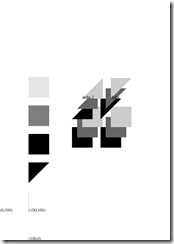
    3.2-FilledShapes
    % test moveto           
    newpath            
        /Times-Roman findfont 15 scalefont setfont            
        100 0 moveto            
        ((100,0)) show            
        0 100 moveto            
        ((0,100)) show            
        100 100 moveto            
        ((100,100)) show
    
    座標がどうなってるのかわからなかったのでお試し。
    x軸 y軸 moveto
    というようなことでよさそうですね。

    色の違う四角形を描画

    3.2-FilledShapes
    % step by step Draw Box           
    newpath            
        100 100 moveto            
        0 72 rlineto            
        closepath            
        fill            
    newpath            
        100 200 moveto            
        0 72 rlineto            
        72 0 rlineto            
        closepath            
        fill            
    newpath            
        100 300 moveto            
        0 72 rlineto            
        72 0 rlineto            
        0 -72 rlineto            
        closepath            
        fill            
    newpath            
        100 400 moveto            
        0 72 rlineto            
        72 0 rlineto            
        0 -72 rlineto            
        closepath            
        .5 setgray            
        fill            
    newpath            
        100 500 moveto            
        0 72 rlineto            
        72 0 rlineto            
        0 -72 rlineto            
        closepath            
        .9 setgray            
        fill

    四角形を描画するプロシージャを定義してみる

    3.2-FilledShapes
    % draw Boxies with procedure           
    /box            
    {            
        72 0 rlineto            
        0 72 rlineto            
        -72 0 rlineto            
        closepath            
    } def 
    newpath           
        352 324 moveto box            
        0 setgray fill            
    newpath            
        370 360 moveto box            
        .4 setgray fill            
    newpath            
        388 396 moveto box            
        .8 setgray fill

    なんか三角形が書けそうだったので

    3.2-FilledShapes
    /delta           
    {            
        0 72 rlineto            
        72 0 rlineto            
        closepath            
    } def            
    newpath            
        352 424 moveto delta            
        0 setgray fill            
    newpath            
        370 460 moveto delta            
        .4 setgray fill            
    newpath            
        388 496 moveto delta            
        .8 setgray fill            
        388 496 moveto            
        0 setgray            
        /Times-Roman findfont 15 scalefont setfont            
        (delta) show 
    /delta2           
    {            
        72 0 rlineto            
        0 72 rlineto            
        closepath            
    } def 
    newpath           
        252 424 moveto delta2            
        0 setgray fill            
    newpath            
        270 460 moveto delta2            
        .4 setgray fill            
    newpath            
        288 496 moveto delta2            
        .8 setgray fill 
        288 496 moveto           
        0 setgray            
        /Times-Roman findfont 15 scalefont setfont            
        (delta 2) show            
    showpage

    もひとつプロシージャ
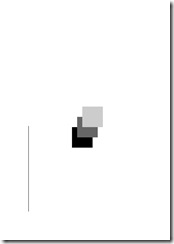
    4.3-UsingProceduresAndVariables
    newpath 
    100 100 newpath moveto           
    0 300 rlineto            
    stroke 
    newpath 
    /inch           
    {            
        72 mul            
    } def 
    /box           
    {            
        newpath            
        moveto            
        1 inch 0 rlineto            
        0 1 inch rlineto            
        -1 inch 0 rlineto            
        closepath            
    } def 
    /fillbox           
    {            
        setgray fill            
    } def 
    3.5 inch 4.5 inch box           
    0 fillbox            
    3.75 inch 5 inch box            
    .4 fillbox            
    4 inch 5.5 inch box            
    .8 fillbox 
    showpage

    文字列の描画

    5.1-DrawString-2
    % vertical position           
    /vpos 720 def            
    % drawing string            
    /word (Typefaces) def 
    /choosefont           
    {            
        findfont 15 scalefont setfont            
    } def 
    /newline           
    {            
        % decrease vpos            
        % side effect            
        /vpos vpos 15 sub def            
        % goto that line            
        72 vpos moveto            
    } def 
    /printword           
    {            
        choosefont            
        % show "typefaces"            
        word show            
        % go to next line            
        newline            
    } def 
    72 vpos moveto           
    /Times-Roman printword            
    /Times-Bold printword            
    /Times-Italic printword            
    /Times-BoldItalic printword            
    newline 
    /Helvetica printword           
    /Helvetica-Bold printword            
    /Helvetica-Oblique printword            
    /Helvetica-BoldOblique printword            
    newline 
    /Courier printword           
    /Courier-Bold printword            
    /Courier-Oblique printword            
    /Courier-BoldOblique printword            
    newline 
    /Symbol printword           
    showpage
    5.1-DrawString

    /Times-Roman findfont 15 scalefont setfont           
    72 200 moveto            
    (typography) show 
    /showGorilla           
    {            
        moveto            
        (Gorilla) show            
    } def 
    /Times-Roman findfont 6 scalefont setfont           
    72 300 showGorilla 
    /Times-Roman findfont 10 scalefont setfont           
    72 275 showGorilla 
    /Times-Roman findfont 15 scalefont setfont           
    72 250 showGorilla 
    /Times-Roman findfont 20 scalefont setfont           
    72 225 showGorilla 
    /scaleTimes           
    {            
        /Times-Roman findfont            
        exch scalefont            
        setfont            
    } def 
    6 scaleTimes           
    172 300 showGorilla            
    10 scaleTimes            
    172 275 showGorilla            
    15 scaleTimes            
    172 250 showGorilla            
    25 scaleTimes            
    172 225 showGorilla 
    /draw           
    {            
        172 exch showGorilla            
    } def 
    6 scaleTimes           
    400 draw            
    10 scaleTimes            
    375 draw            
    15 scaleTimes            
    350 draw            
    25 scaleTimes            
    325 draw 
    showpage

    文字列と図形

    5.2-GraphicsAndText
    /choosefont           
    {            
        exch findfont exch scalefont            
    } def 
    /MainFont           
    {            
        /Helvetica-Bold 15 choosefont            
    } def 
    /SloganFont           
    {            
        /Helvetica-Oblique 7 choosefont            
    } def 
    /OwnerFont           
    {            
        /Helvetica 10 choosefont            
    } def 
    /rightshow           
    {            
        dup stringwidth pop            
        120 exch sub            
        0 rmoveto            
        show            
    } def 
    /CardOutline           
    {            
        newpath            
        90 90 moveto            
        0 144 rlineto            
        252 0 rlineto            
        0 -144 rlineto            
        closepath            
        .5 setlinewidth            
        stroke            
    } def 
    /doBorder           
    {            
        99 99 moveto            
        0 126 rlineto            
        234 0 rlineto            
        0 -126 rlineto            
        closepath            
        2 setlinewidth            
        stroke            
    } def 
    /Diamond           
    {            
        newpath            
        207 216 moveto            
        36 -54 rlineto            
        -36 -54 rlineto            
        -36 54 rlineto            
        closepath            
        .8 setgray fill            
    } def 
    /doText           
    {            
        0 setgray            
        90 180 moveto            
        MainFont setfont            
        (Diamond Cafe) rightshow            
        90 168 moveto            
        SloganFont setfont            
        ("The Club of Lonely Hearts") rightshow            
        216 126 moveto            
        OwnerFont setfont            
        (Sam Spade) show            
        216 111 moveto            
        (Owner) show            
    } def 
    CardOutline           
    doBorder            
    Diamond            
    doText 
    newpath           
    10 10 moveto            
    (string1) show            
    (string2) rightshow            
    (string3) rightshow            
    (string4) rightshow 
    showpage

    回転
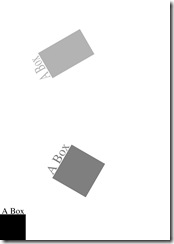
    6.1-CoordinateSystems
    /choosefont           
    {            
        exch findfont exch scalefont setfont            
    } def 
    /Times-Roman 30 choosefont 
    /square           
    {            
        newpath            
        0 0 moveto            
        90 0 lineto            
        90 90 lineto            
        0 90 lineto            
        closepath            
        fill            
        6 92 moveto            
        (A Box) show            
    } def 
    /slide           
    {            
        300 150 translate            
        60 rotate            
    } def 
    square 
    slide           
    .5 setgray            
    1.5 1.5 scale            
    square 
    slide           
    .7 setgray            
    .75 1.25 scale            
    square 
    showpage

    6.2-GraphicState
    /starside{           
        72 0 lineto            
        currentpoint translate            
        -144 rotate            
    } def 
    /star{           
        moveto            
        currentpoint translate            
        %4 {starside} repeat            
        %closepath            
        5 {starside} repeat            
        gsave            
        .5 setgray            
        fill            
        grestore            
        stroke            
    } def 
    200 200 star 
    /cycling{           
        15 {            
            30 30 star            
            30 rotate            
        } repeat            
    } def 
    /drawing{           
        5 {            
            30 -30 translate            
            cycling            
        } repeat            
    } def 
    drawing 
    showpage


    とりあえず今日はここまで。英語読むのもしんどいし。読み進めてるのはこちらの青本。
    PostScript(R) Language Tutorial and Cookbook (APL)
    PostScript(R) Language Tutorial and Cookbook (APL)
    posted with amazlet at 09.10.07
    Adobe Systems Inc.
    Addison-Wesley Professional
    売り上げランキング: 235737
    おすすめ度の平均: 5.0
    5 まず最初に読むべき入門書
    5 効率の良いPostScript書くなら…
    Amazon.co.jp で詳細を見る